


Trending Prank App
3.616.00 Reviews
App Specs
- Version
- 2.5.2
- Updated On
- License
- Free
- Downloads
- 5,000,000+
- Developer
- Joy Buzz Games
- Categories
- Entertainment
- Platform
- Android
Screenshots
 Analysis by AppCompare
I’d treat Trending Prank as a party-game app rather than a way to fool someone into a serious decision. Its appeal is quick, staged comedy: set up a harmless surprise, share the reveal, and move on together. That distinction matters. A fake call or chat can be funny among friends who know each other’s limits, but it can also cause real worry if the setup imitates bad news, a workplace emergency, or a private conversation. I get the most value from this kind of app when the joke is brief, the audience is willing, and nobody is left embarrassed afterward.
Where the fun can get stuck
The first friction is not necessarily technical. It is choosing a prank that fits the room. A broken-screen effect may work as a quick visual gag with a close friend, while a simulated call can feel uncomfortable if it arrives during work, class, or a stressful moment. I’d decide on the setting and the person before opening the app, then choose the mildest setup that still makes the joke clear.
There is also a difference between a prank that looks convincing for a second and one that is believable for too long. The longer someone thinks a fake situation is real, the greater the chance that amusement turns into frustration. I’d plan the reveal in advance and keep it close at hand, especially if the gag involves a fake conversation or a screen effect. If the other person seems worried rather than amused, ending the bit immediately is the right move.
Simple checks before you try a prank
Before using a feature, I’d explore its controls privately and check what the on-screen prompts ask me to do. That quick rehearsal helps avoid fumbling in front of other people, and it makes it easier to tell whether a feature fits the moment. For a timed fake call, for example, I’d choose a moment when I can actually answer and explain the joke rather than setting it up and forgetting about it.
It’s worth checking the device’s sound level and display before relying on a ringtone or visual effect. A prank that is too quiet may not land; one that is unexpectedly loud can bother people nearby. I’d also avoid handing over a phone with private notifications or personal material visible. That’s a general good habit when showing any app to someone, and it keeps a silly moment from becoming a privacy problem.
Recovering when the setup goes wrong
If a prank does not trigger when expected, I would first return to the feature and review the choices I made rather than immediately repeating it. Confirm the selected caller or effect, check the timing, and make sure the phone is still in the situation you planned for. A missed cue is usually easier to handle with a quick reset than with several rushed attempts while everyone is watching.
If the app seems unresponsive, I’d close and reopen it, then try the same action once more. If only sound is missing, check the device’s volume and silent setting before changing the prank itself. For a visual effect that is hard to see, look at brightness and screen orientation. These basic checks do not guarantee a fix, but they help separate a simple device setting from an issue with the app.
Worth Reading Before You Choose

EA SPORTS FC Mobile 26 Is a Bigger Football Game, but It Takes Time

Flipboard Shows What News Apps Must Do Beyond the Feed

Switching to Android Auto Means Rethinking Your Driving Routine

Google Calendar Makes a Crowded Week Easier to Manage

Ludo King Makes the Most of the Minutes Between Plans

Baby Panda World Brings Quick Play to Modern Phones, but Its Game Library Feels Busy
When the phone or setting is the real obstacle
Sometimes the problem is the situation, not the app. A noisy room can drown out a call sound, and a busy gathering can make it difficult to time a reveal. If the phone is being used for something important, such as navigation or an expected real call, I would skip the prank rather than interfere. The best setup is one where I can stay in control of the device and stop the joke without disrupting anyone else.
I also wouldn’t use a simulated chat to pass off invented messages as evidence or to stir up conflict. The format can be playful, but screenshots travel beyond the original audience and can lose their context. If I share a gag, I’d make sure the people involved are comfortable with it and that viewers can tell it is pretend. That small bit of care is more important than making the setup look perfectly real.
Who will enjoy it, and who may want something else
This is best suited to people who like quick, low-stakes jokes and already have a friendly audience in mind. It can work during a relaxed family visit, a casual hangout, or a small get-together where everyone understands the mood. A practical example: while waiting for friends to arrive, I might prepare a mild fake call, let it happen during a quiet pause, and reveal the joke as soon as they react. That gives the moment a beginning and an end instead of leaving someone to wonder what happened.
If your group prefers shared games, puzzles, or planned party activities, a conventional party-game app may be a better fit. Those options make participation more explicit and do not depend on one person being temporarily fooled. I’d also skip this app if you want a serious calling tool, a messaging service, or a dependable way to contact someone. Its entertainment premise is staged surprise, not real communication.
What Makes the Trending Prank App Stand Out?
If you're looking for a way to add a dash of humor and a sprinkle of surprise to your day, let me introduce you to the Trending Prank App. This little gem is your ultimate toolkit for light-hearted mischief, perfect for pulling off those classic pranks that'll have your friends and family in stitches.
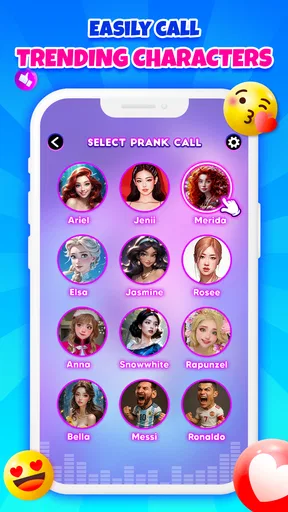
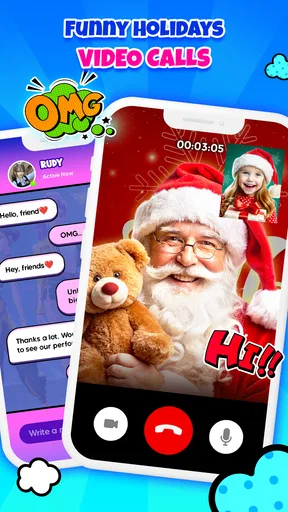
First off, let's talk about the variety. The Trending Prank App offers a delightful selection of pranks that cater to every sense of humor. From fake calls and broken screens to more elaborate setups like fake chat conversations, this app covers all bases. It's like having a Swiss Army knife of pranks right in your pocket.
One feature that really grabbed my attention was the user-friendly interface. You don’t need a degree in tech wizardry to navigate this app. Everything is laid out clearly, making it easy to jump right in and start planning your next prank. Plus, the app’s design is sleek and modern, which is always a nice touch.
Getting Started: Easy Peasy
Downloading and setting up the app is a breeze. Once installed, you're greeted with a simple tutorial that guides you through the basics. Trust me, in no time, you'll be setting up pranks like a pro.
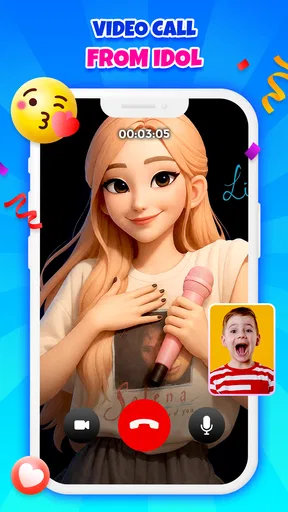
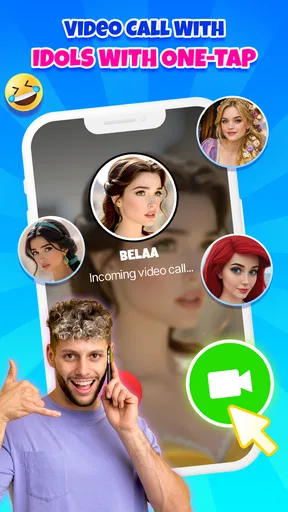
I particularly enjoyed the fake call feature. You can customize the caller’s name, number, and even the ringtone. Imagine your friend’s face when they think they’re getting a call from a celebrity or their boss — priceless!
Dive Into the Prank Pool
The app offers an impressive list of pranks:
- Fake Calls: Choose the caller and set a timer for the call to come in at just the right moment.
- Broken Screen: Give someone a mini heart attack with a realistic cracked screen effect.
- Voice Changer: Record a message and transform your voice to sound like a robot, alien, or even a chipmunk.
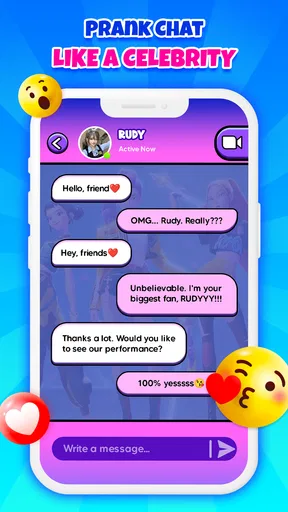
- Fake Chat: Create convincing chat conversations that look just like the real thing.
Each prank is highly customizable, which makes the possibilities endless. You can adjust settings to suit your target, ensuring that your prank lands just right.
Making the joke land without creating a mess
The customization is most useful when it supports timing and tone, not when it makes a prank harder to recognize as a joke. I’d keep a fake caller’s identity obviously silly rather than choosing a real person whose name could cause alarm. A playful character or an exaggerated scenario gives the audience a clue that this is entertainment, while still leaving room for a surprise.
For a fake chat, I’d keep the participants fictional or use names only with the people’s permission, and I would avoid copying a real private exchange. That makes the gag easier to share without exposing anyone’s messages or inviting misunderstandings. With a voice effect, a short line is usually more effective than a long performance: the novelty is in hearing the altered sound, and a brief clip is easier to replay or abandon if it does not get a laugh.
There is a small trade-off between preparation and spontaneity. Setting up details can make the moment feel more tailored, but too much time spent perfecting a scenario can make it awkward to deliver. I’d choose one simple premise, check the important settings once, and stop tweaking. A clean, quick reveal tends to be kinder and funnier than a complicated setup that requires everyone to keep pretending.
A light entertainment app, not a communication substitute
Trending Prank is an entertainment app from Joy Buzz Games. It is free, carries an Everyone 10+ content rating, and has an average rating of 3.7 from around 2,400 ratings, with over 5 million installs. I read those figures as a sign that the concept has found a sizeable audience, but they don’t tell me whether every prank will suit my friends or work smoothly on every phone. The app is currently at version 2.3.4, and it runs on devices with Android 7.1 or later.
That makes it easy to consider if you want a casual novelty rather than a tool you’ll rely on every day. I would not install it expecting a full social network or a replacement for ordinary calling and messaging. The fake call and chat formats are props for a joke; they should not be confused with real contact. If the goal is to coordinate plans or keep in touch, the usual phone and messaging apps are the sensible choice.
Compared with other light entertainment options, its particular draw is the act of staging a reaction. A quiz or party game asks everyone to play openly; a prank app puts one person in charge of the setup and makes the surprise the activity. That can be more spontaneous in a small group, but it also places more responsibility on the person holding the phone. If your friends dislike being singled out, a game where everyone participates on equal terms is likely to be more comfortable.
What to expect before installing
The app is free, so it is easy to try without treating it as a major commitment. I’d still approach the first session as a test: open the features you expect to use, understand their controls, and see how the effects look and sound on your own device before involving anyone else. That is especially helpful if you plan to use a fake call in a particular moment; it lets you verify the timing and ringtone privately instead of discovering a mismatch in front of your audience.
Because this is a prank app, the most useful question is not simply whether it has several effects, but whether you have a safe, welcome occasion for them. If you can think of a friend who enjoys silly surprises and a setting where a quick reveal is easy, it may be worth keeping around for an occasional laugh. If you mainly want something to browse alone, or your humor relies on making someone genuinely anxious, I’d choose another kind of entertainment.
Why You'll Love It
What I love about this app is its ability to bring people together through laughter. In a world that sometimes feels a bit too serious, having a tool for harmless fun is a breath of fresh air. The app encourages creativity and, most importantly, doesn’t take itself too seriously. It’s all about creating moments of joy and surprise.
Another standout feature is the community aspect. The app allows users to share their prank ideas and success stories, which is a fantastic way to get inspired. It’s like being part of an exclusive club of pranksters.
I’d treat that sharing element as inspiration rather than a guarantee that someone else’s idea will suit my own group. A prank that works between close friends may fall flat with relatives or coworkers, so I’d adapt ideas to the people present and keep their comfort in mind. The app’s rating reflects a mixed overall response, which is another reason I’d approach it as a light novelty instead of assuming it will become a regular favorite for everyone.
Is It Worth It?
In a word: absolutely. The Trending Prank App is perfect for anyone looking to spice up their day with a bit of fun. It’s user-friendly, packed with features, and most importantly, it delivers on its promise of laughs. Whether you’re a seasoned prankster or new to the game, this app is a must-try.
My recommendation is a little more selective: I’d try it if I enjoy playful, brief surprises and can choose the right moment, but I wouldn’t call it essential. The value depends on having people around who are in on the spirit of the joke. It is less suitable for anyone who wants polished, ongoing entertainment, dependable real-world communication, or a prank that depends on deceiving someone for an extended time.
Keep in mind, though, that pranking should always be done in good spirit. Make sure your target is someone who appreciates a good laugh, and always respect boundaries. Happy pranking!
Pros
- User-friendly interface for easy navigation.
- Wide variety of pranks to choose from.
- Regular updates with new prank content.
- Minimal ads for an uninterrupted experience.
- Customizable prank settings for personalization.
Cons
- Some pranks require in-app purchases.
- Limited offline functionality.
- May not be suitable for all age groups.
- Some pranks can be repetitive.
- Push notifications can be intrusive.
FAQs for Trending Prank App
What is Trending Prank App and how does it work?
Trending Prank App is a fun and interactive application designed to create prank scenarios using your smartphone. It offers a variety of prank options like fake calls, broken screen simulations, and more. Users can select a prank, customize settings, and execute it seamlessly to surprise friends and family.
Is Trending Prank App safe to use on my device?
Yes, the Trending Prank App is designed with safety in mind. It does not require excessive permissions and ensures that all pranks are purely simulated without causing any harm to your device. Always download it from reputable app stores to avoid counterfeit versions.
Are there any hidden costs or in-app purchases in Trending Prank App?
While the Trending Prank App is free to download, it does offer optional in-app purchases for additional features and prank options. These purchases are clearly outlined within the app, allowing users to decide if they want to enhance their prank toolkit.
Can I use Trending Prank App without an internet connection?
Yes, many features of the Trending Prank App can be used offline, such as pre-downloaded prank sounds and effects. However, some elements, like accessing new prank updates or certain interactive features, may require an internet connection.
What devices are compatible with Trending Prank App?
Trending Prank App is compatible with most Android and iOS devices. It requires a minimum operating system version, which is typically specified in the app store listing. Ensure your device meets these requirements for optimal performance and functionality.


